Pitch Changer

How to change the pitch of a video
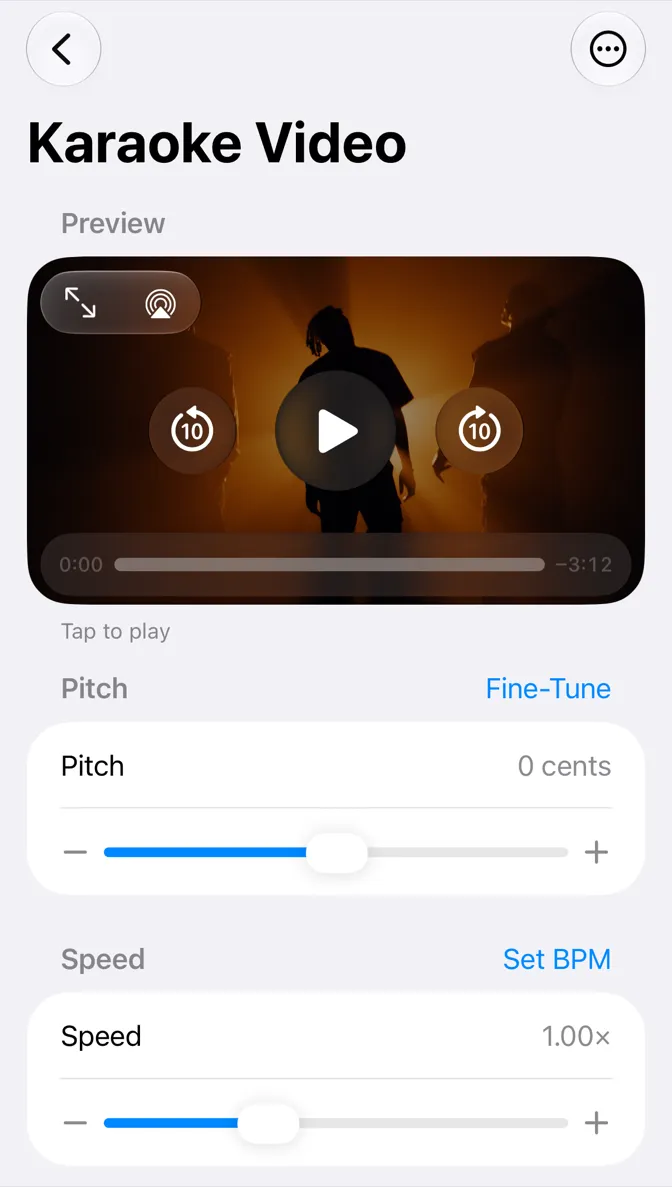
To change the pitch of a video in Pitch Changer:

  1. Tap the + button and choose Photos (Video from Photos on Android), or Files if the video is not in your photo library. Pitch Changer cannot open a link or a video inside another app such as YouTube or TikTok.
  2. Drag the Pitch slider right to raise the pitch or left to lower it. Each step is one semitone, which the app shows as 100 cents. On a voice, 100 to 300 cents is easy to hear and still sounds like a person. Past that, a raised voice sounds like a cartoon and a lowered one like a slowed-down recording.
  3. Tap the preview to watch the video with its new pitch.
  4. Tap Export to save the new video.

Changing the pitch does not change the length of the video. To make the video slower or faster as well, drag the Speed slider. The picture slows down or speeds up with the sound.

To put a song in a particular key, use the key change calculator.

Play songs in a different key or at a different speed. Pitch Changer lets you change the pitch and speed of music or videos on your phone or tablet. It only takes three simple steps: - Import audio or video - Change pitch, speed, or both - Export Fine-tuned pitch shifting: You can adjust the pitch using a slider with hundred-cent steps, or enter an exact cent value for precise control. Change speed: Slow down or speed up audio and video from 0.5× to 2× without changing the pitch. Export your file at the speed you select. Set BPM: Enter the original and target tempo in beats per minute (BPM) to calculate and apply the speed change. View transposed key: Enter the original key and octave to see the key and octave of your exported file. If you have any suggestions on how to improve Pitch Changer, feel free to contact App Support. A Pro subscription is required for unlimited projects, unlimited exports, unlimited file duration, precise pitch adjustment, setting speed by BPM, and viewing the transposed key. Terms of Use: https://www.apple.com/legal/internet-services/itunes/dev/stdeula

© 2026 All rights reserved.